Invite and verify talent
Sending the invite, what the performer sees on their side, reading their progress, and fixing a failed ID check.
On this page
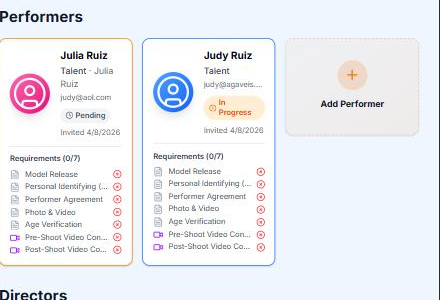
You invite each performer by email. They complete everything on their own device through a single link, without creating an account.
Sending an invite
- 1
Open the scene's talent section
Every scene has one; on a fresh scene it holds only the add control. You can build the cast while the scene is still a draft.
- 2
Enter their details
Their legal name as it appears on their ID, date of birth, sex, email and phone, plus their role on the scene. Stage names and any other names they have used go in too, because they become part of the federal record. The email has to be one they control, because the link that arrives is their access: no account, no password, just the link. The role decides the paperwork: performers receive the identity worksheet and the model release, while photographers, videographers and crew receive the agreements that apply to them, plus anything your production adds.
- 3
Send
A new scene starts as a draft, and adding someone to a draft sends nothing yet. Activating the scene sends everyone on it their invitation from noreply@easy2257.com, with a link that stays valid for 30 days. Anyone you add after that gets theirs the moment you add them. The exception is anyone you mark Don't email this person, for when you already hold their signed documents and ID.
What the performer sees
This section is written to the performer, so you can send them the link to it instead of explaining the process yourself.
You received an email because a producer added you to a scene. Everything happens through that one link, on your own device, and you do not create an account.
- The link opens the scene's paperwork addressed to you: who invited you, which production, which scene.
- First you check your details: your legal name exactly as it appears on your ID, every other name you have used, your date of birth, and your phone and address. The form opens with what is already on file, so you correct only what does not match.
- You confirm who you are with a government photo ID and a selfie. The ID is a driver's license, passport, state ID, or national ID card, photographed straight on, in focus, with every corner visible; the selfie is taken live and compared with the photo on the ID. If you are outside the United States, a passport or your country's national ID card works; a passport is the most widely recognized. If you passed this check for another scene in the last 12 months, under the same email address, and that ID has not expired, it carries over and you are not asked again.
- Then you add a second ID, with photos of its front and back. The name on it has to match your first ID; if the two cannot be matched automatically, the producer reviews them instead.
- You sign the documents for your role. Each one is shown in full before you sign it on screen. The model release is the one everything else waits on; the scene cannot be closed without yours.
- The last step is your final signature and a certification, and then you are finished. A confirmation email follows.
- What happens to your ID: it goes into encrypted compliance storage with a SHA-256 digest recorded at upload, it is visible to the producer inside this scene's record and to nobody else, and it is retained for the period federal record-keeping law requires. That retention is the entire point of the exercise.
Reading the statuses
| Status | It means | The next move is |
|---|---|---|
| Pending | Not opened yet; on a draft, not sent yet | Activate a draft; resend if it goes stale |
| Opened | They opened the link but have not started | Theirs |
| In progress | Working through verification and signing | Theirs |
| ID uploaded | Their ID is in, awaiting verification | Review |
| ID verified | Identity confirmed; documents remain | Theirs |
| Documents uploaded | Documents signed; final signature still due | Theirs: the final signature |
| Completed | Finished; nothing outstanding | Nobody; close-out counts them |
When someone stalls
Resend from their row. A resend issues a fresh email and a fresh 30-day window, and nothing they already completed is lost.
Removing a performer takes them out of the active cast, and that is all it does: every record already collected stays with the scene, because compliance records cannot be un-collected. If the same person is added back later, their earlier records revive rather than repeat. Nothing on this screen erases anything, so there is no action here to hesitate over.
Performers outside the United States
The same link, the same steps. The identity check accepts passports, national ID cards, driver's licenses and residence permits from more than 230 countries and territories, and the second form of ID takes the same document types with any issuing country. What changes is only the document the performer holds: a passport is the best choice everywhere, national ID cards next, and voter cards, benefit cards and membership cards are not identity documents wherever they were issued. Identity documents from outside the United States has the country-by-country list and what to do when a document will not scan; Foreign talent and productions covers what federal record-keeping law and the card networks require.
When ID verification fails
It is usually a photo problem, not an identity problem.
- Glare, cropped corners, blur, or low light: retake it flat on a matte surface in daylight, and check all four corners are in frame.
- A photo of a screen never passes. Use the physical document.
- An expired document fails on its date. It needs a current one.
- A name mismatch is fixed on the account side, by matching the spelling to the document. Never the other way around.
- Face comparison wants a bare face in even light, no filters, no glasses if the photo keeps failing.
For a document the automated check cannot handle, there is a manual path: you collect and upload the document directly on the performer's row. What is stricter about it is that the examination becomes yours, and you attest to exactly that at close-out. The record standard does not drop: manual uploads are encrypted and receive their SHA-256 digest on ingest, the same as everything else.
Related
Still stuck?
Tell us what you were looking for and we will work it out with you.