Create a production and a scene
How the two relate, what flows down from one to the other, and what a scene's status is telling you.
On this page
A production is the container; a scene is one shoot with a defined cast. Everything a record needs attaches to the scene.
Why the split exists
A production is a body of work: a series, a site, a shoot weekend. A scene is one shoot with one cast, and the records the law cares about attach at scene level, because that is where a specific set of people made a specific piece of content.
Some things are set once on the production and flow into every scene: the production's name, which appears on generated paperwork and invitation emails; its location and dates as defaults; and which documents the production sends beyond the standard set. A scene carries its own number, title, date and location.
The usual first-try mistake is creating one production per scene. It works, but it scatters what belongs together: the archive, the cross-reference index and finalizing all operate per production, so a series split across ten productions produces ten of everything.
Creating them
- 1
Create the production
New Production sits on the dashboard and on the Productions page; an empty account shows it front and center. Name it what the work is actually called. The name travels: generated documents, invitation emails and the archive all carry it.
- 2
Add a scene
From the production page. A scene takes a number, an optional title, a date and a location. The date matters most, because it anchors the record's retention clock and the reporting built on it. An untitled scene simply displays as its number.
- 3
Save
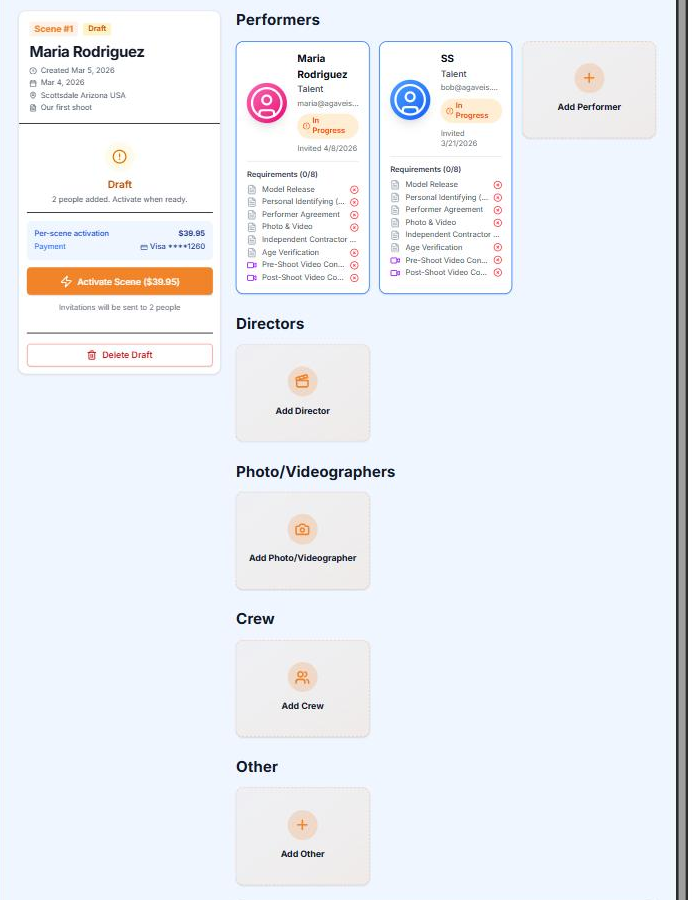
The scene is created as a draft. Drafts are free and fully editable, and nothing is charged until you activate. What it is waiting for is a cast, then activation.
The scene lifecycle
A scene has four states, and the words in the product are the words here:
- Draft. Created, not yet activated. Free. Edit anything, build the cast, take your time.
- Active. Activated and paid for. Invitations are live, the cast verifies and signs, records accumulate. You can still add people to an active scene.
- Closed. Closed out and sealed: every performer's release signed, your attestation recorded. The scene's public compliance page proves the record exists. Sealed does not mean untouchable: a depiction published later can still be added, with a short statement of why it arrives after close, and published URLs can be added or removed at any time. See Correcting a closed scene.
- Cancelled. The exit for a scene that will not finish. Cancelling keeps every record already collected; nothing is erased.
What moves a scene forward: a draft becomes active when you activate and pay for it; an active scene becomes closed when you close it out with its checklist met. Cancel is available from draft and active both.
What a scene needs before it can close
- Every performer verified, with a signed model release. This is a hard gate, not a warning: Close out a scene covers it.
- Compliance forms and assigned documents finished by everyone on the scene, and the post-shoot sign-off video where the scene's preset requires one. Warnings about these can be overridden with a checkbox; the release gate cannot.
- Your producer attestation, which you sign at close-out itself.
Building the cast and getting them through verification is its own page: Invite and verify talent.
Still stuck?
Tell us what you were looking for and we will work it out with you.