Activate and pay for a scene
When the charge happens, what it unlocks, and what to do when the card is declined.
On a per-scene plan, a scene stays a draft until it is paid for. This is the step most accounts stop at, so it is worth reading before you get there.
Two sentences up front, because they prevent the two common worries: retrying a failed payment does not create a second charge, and a draft costs nothing while you sort a card out.
When the charge happens
Activation is the payment moment. Creating a scene is free, building the cast costs nothing, and nothing recurs per scene: one scene, one charge, at the moment you activate. The current per-scene price is on the pricing page.
The charge covers that scene's record for its life: the cast's invitations and verification, storage with integrity digests, close-out, and the scene's place in the production archive. It does not cover other scenes.
On a producer subscription that includes a scene allowance, activation draws on the allowance instead of charging the card, for as long as allowance remains.
Activating
- 1
Open the scene
Activate sits at the top of a draft scene's page, and on a fresh draft it may be the only enabled action. That is the lifecycle, not a fault: everything else unlocks once the scene is active.
- 2
Confirm
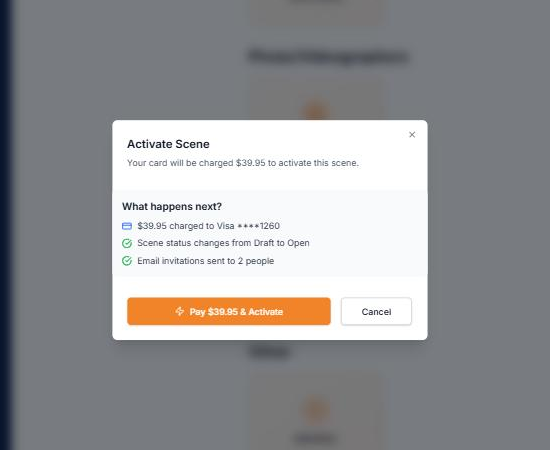
Before anything is committed you are shown exactly what you are about to pay, or that this activation comes out of your plan's allowance. Nothing has been charged up to this point.
- 3
Wait for confirmation
Success flips the scene to Active and sends every cast member you have added their invitation. It takes moments. If the page is still waiting, refresh once rather than starting a second attempt. Activation is not reversible: an active scene can be closed out or cancelled, never returned to draft.
If the card is declined
The message tells you the bank declined the charge. It rarely tells you why, because banks do not share the reason with the merchant.
Declines happen more often in this category than most: card risk systems flag adult-adjacent merchants, and a call to your bank authorizing the charge usually clears it in one attempt.
Retrying does not create a second charge. A declined attempt charged nothing, and a scene can only ever be activated once, so there is no path to paying twice by trying again.
What not to do: create a second scene, or a second subscription, to work around a decline. That only duplicates the thing that is stuck. Update your card under Billing instead; the draft waits exactly where you left it.
After activation
The scene is live and its cast has mail. Continue to Invite and verify talent.
Still stuck?
Tell us what you were looking for and we will work it out with you.